Distorted UI: Windows 11 JUCE 8.0.10

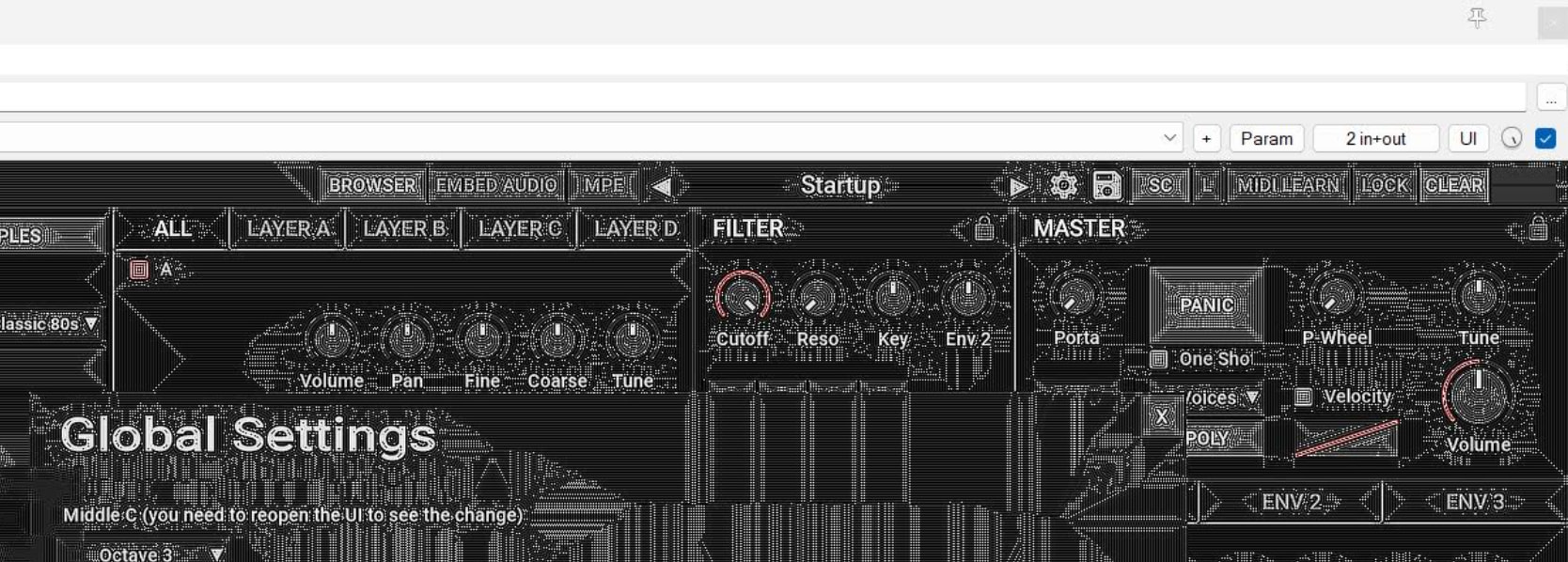
Maybe someone here has already seen something like this. I have one user who reported this problem (plugin, VST3, Reaper). The problem happens when he uses the NVIDIA and also his onboard graphics card for Windows. Here is a screenshot:

For me, it looks like a problem with Direct2D. Maybe even hardware-related. Ideas on what the user or we can do about this are welcome.

Edit: I asked the user to run dxdiag. Probably it shows any problems.
Edit: This has to be a shader :slight_smile:

We haven’t had anything out in the wild with Direct2D yet, so haven’t seen anything like this before. Did they give system specs?

I don’t think the root source of the problem is JUCE related. I wonder how this pattern can evolve. It looks like some pixels are written to the wrong graphic memory address or read out the wrong way. Hope the dxdiag application shows some problems.

I got some system information. Its a Razor Blade 15 Laptop. Most likely with the following config. Probably there are different configurations for this laptop.

GeForce RTX 2070 Max-Q
Core i7 10th Gen
300Hz FHD display
Intel HM470 Chipset

I found the following instructions to fix the problem:

Will forward this to the user.

The user had some additional information. Looks like the problem happens only on the external screen.

2 Likes

Installing the latest NVIDIA drivers as mentioned in the reddit article fixed the issue for the user.

1 Like