The AAX wrapper isn’t compiled at all on OSX. There’s a define JUCE_INCLUDED_AAX_IN_MM right on top of the AAX wrapper which isn’t set anywhere (I don’t really get why it’s in there, but anyway…). If you set JUCE_INCLUDED_AAX_IN_MM=1 in XCode’s preferences, the plugin is recognized and loaded in the developer version of Pro Tools.
Edit: Code signing works as well… first you need to sign the framework in the AAX bundle using codesign, then sign the AAX plugin as usual.
Actually, #define JUCE_INCLUDED_AAX_IN_MM 1 should be in juce_audio_plugin_client_AAX.mm, which is now the file that includes juce_AAX_Wrapper.cpp (it used to be juce_AAX_Wrapper.mm which also has that define in it, but no longer gets compiled).
I have now implemented this, please update to the newest tip!
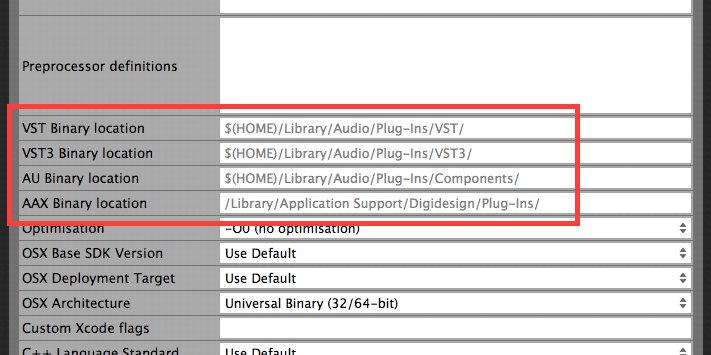
You will find these new Projucer build settings. Grey means it’s using the default setting - you can however override it per configuration (debug/release).
Since Pro Tools 10 (which means for all AAX), the correct install location for OSX plug-ins is /Library/Application Support/Avid/Audio/Plug-Ins
Not /Library/Application Support/Digidesign/Plug-Ins
And if you are using a PT10 developer version you’ll also need to copy it to /Applications/ProTools_3PDev/Plug-Ins
in order for it to show up there. Which means if you have PT10 dev co-installed with PT 10 release or PT 11 or 12, you’ll need to deploy the binary to multiple locations, perhaps with a post-build script.
Yeah the paths were mixed up, but I already fixed it yesterday:
And now you can specify a different binary location for Debug and Release respectively, so you could use the ProTools_3PDev one for Debug if you’re still on PT10.
Also, yes, just like you say, you can add a post-build script to copy that binary to as many additional locations as you want. So I think it’s all fine now, no?
Should this feature support relative paths? When I add leading …/…/'s, I end up with an error in Xcode, which strips all ascenders and tries to place the binary at root /