I believe the JUCE FFT on Mac uses the Accelerate framework so in an effort to improve FFT performance on Windows (specifically the FIR class) I have installed Intel IPP and ticked the “Use Intel IPP” box in the Projucer.
To check that IPP is being used you can stick a breakpoint at juce_FFT.cpp:829, just inside IntelPerformancePrimitivesFFT::create (const int), and then launch the program. The breakpoint will be hit if IPP is being used.
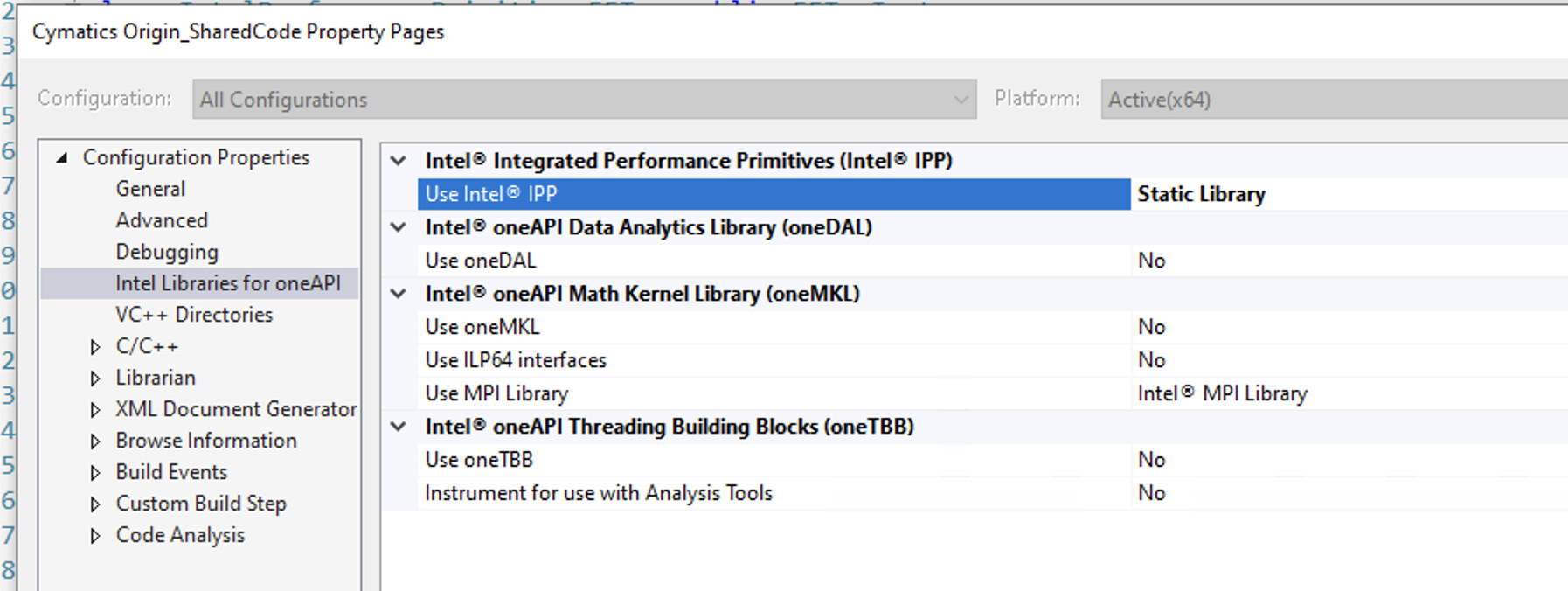
Here’s something I’ve noticed. I have to enable the IPP libraries manually in Visual Studio 2019 otherwise the Properties section for the shared code target is set to “NO” until I set it to Static Library as below.
Is your Projucer built from the very latest develop? I added a feature very recently to support the new “oneAPI” distribution of the IPP library:
If you haven’t tried this yet, please rebuild Projucer from the current develop branch, ensure that “Use IPP Library (oneAPI)” is set to an appropriate value, then resave your project and try building it in Visual Studio.
Here’s an odd thing. Every time I open a session with the Projucer built from the develop branch some of the settings revert to defaults. For example Runtime Library reverts to DLL when it should be static for this plugin:
I’ve noticed this too, but was unsure if this was a byproduct of rebuilding the Projucer more often, and the settings reverting to defaults each time the Projucer was rebuilt. I’ve been adding new fields in prep to submit some PRs for mobile exporter feature requests and was trying to pinpoint exactly when the values were being reset to defaults.
I’m struggling to get Intel IPP working with JUCE via Projucer & VS2022/Clang on Windows 11, which I’m pursuing in order to potentially accelerate dsp::convolution inside my VST3 plugins.
Could somebody please help me out with a clue as to what I’ve missed?
I haven’t yet found a consolidated step-by-step guide to activating IPP, but in a game of trial and error I’ve tried several combinations of the below steps that I found around the web (including from this thread):
Alternatively adding atop my PluginProcessor.h #define _IPP_SEQUENTIAL_STATIC 1
Checking for success by trying to hit a debugger breakpoint inside juce_FFT.cpp just before line 824 (in JUCE v7.0.9): static IntelPerformancePrimitivesFFT* create (const int order)
Note, my dsp::convolution code works OK with the normal JUCE FFT, i.e. without IPP.
Using step 8, I can build but I don’t encounter the breakpoint upon execution (per step 9).
Using step 7, building produces 28 errors “macro name must be an identifier”, almost all in line 9 of “MyPlugin_SharedCode”. I can’t find a source file of this name, but my build folder does contain a MyPlugin_SharedCode.log file, which is basically a copy of my VS2022 Output window, except each instance of the error is appended with “In file included from (built-in):422:”
I found this post discussing the “macro name must be an identifier” error, and tried setting Projucer/Settings/Use Global AppConfig Header = Enabled (h/t @reuk), which unfortunately didn’t help.
OK I figured this out, with help from some folks over on discord.
In case anyone else is facing the same challenge, here is an improved version of the above, with just the steps that seem important for getting JUCE to switch to the Intel IPP FFT algorithm on PC (specifically w.r.t. juce::convolution):
Set Projucer/Exporters/VS2022/Use IPP Library (oneAPI) = Static Library
Set Projucer/Exporters/VS2022/Release/Header Search Paths = C:\Program Files (x86)\Intel\oneAPI\ipp\latest\include\ipp
Set Projucer/Exporters/VS2022/Release/Extra Library Search Paths = C:\Program Files (x86)\Intel\oneAPI\ipp\latest\lib
Set Projucer/Exporters/VS2022/Extra Preprocessor Definitions = _IPP_SEQUENTIAL_STATIC=1
Check for success by trying to hit a debugger breakpoint inside juce_FFT.cpp at line 829 (assuming JUCE v7.0.9), inside the function “static IntelPerformancePrimitivesFFT* create (const int order)”; more importantly look for a significant improvement in FFT speed. I still need to run further performance tests, but I’m pretty sure I’m seeing a >2x speedup.
While trying to setup a basic JUCE8 project with cmake, I found very annoying having to open the Visual Studio project for enabling IPP.
This is what was needed on CMakeLists.txt, assuming you having installed oneAPI:
# On windows we need IPP for the FFT
if(WIN32)
    find_package(IPP REQUIRED)
endif()
if(IPP_FOUND)
    message(STATUS "IPP found!")
    target_include_directories(MyPluginTarget
        PRIVATE
            "C:\\Program Files (x86)\\Intel\\oneAPI\\ipp\\latest\\include\\ipp")
    target_link_libraries(MyPluginTarget
        PRIVATE
            IPP::ipps
            IPP::ippcore)
    target_compile_definitions(MyPluginTarget
        PRIVATE
            _IPP_SEQUENTIAL_STATIC=1)
endif()
I still find it a bit cumbesome. Has anyone figured out a better way?
We wrote our own FindIPP.cmake script a while ago, that searches for IPP in all places that we are aware of and then creates a single interface library target that always links against the static versions of ippcore, ipps and ippvm and then also adds the include paths to that target. This makes linking against IPP a simple three liner and all just works:
set (CMAKE_MODULE_PATH ${CMAKE_MODULE_PATH} <folder where FindIPP.cmake is placed>)
find_package (IPP REQUIRED)
target_link_libraries (MyPluginTarget PRIVATE ipp)
You find that script here, possibly needs some slight adjustments for your specific use case, but a good starting point: