Window Content Shifted after Sleep Mode

JUCE v8.0.10

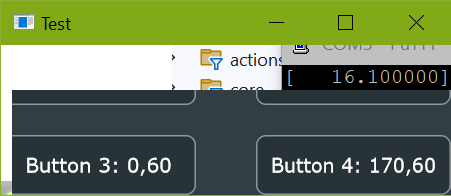
Hi, this is a strange problem: when Windows wakes up after Sleep (or hibernation), the Content component in my window (instance of DocumentWindow)is shifted up and to the left as if there was no window decoration. The bottom and right areas are transparent. The mouse is acting on the correct positions, so button hover messages are happening with an offset to what you see. GUI updates (repaint, resized() etc.) will not fix that the origin of the components are shifted (screenshot 2).

Moving the window (by dragging the title bar) will reposition the content component so that the bottom and right areas are correct, but now the area which was covered by the title bar is transparent (screenshot 3).

Resizing the window will finally fix it.

I was not able to find a work-around. I tried, for example, calling resized() after sleep mode, but it would just re-layout using the shifted origin.

  1. Correct screenshot:

  1. After Sleep:

(there is stuff visible that is behind the Test window)

  1. After moving window:

Here is that minimal application to reproduce the issue:

#include "JuceLibraryCode/JuceHeader.h"

class NewProjectApplication  : public juce::JUCEApplication
{
public:
    NewProjectApplication() {}

    const juce::String getApplicationName() override { return "Test"; }
    const juce::String getApplicationVersion() override    { return "0.1"; }
    bool moreThanOneInstanceAllowed() override             { return true; }

    void initialise (const juce::String& commandLine) override
    {
        mainWindow.reset (new MainWindow (getApplicationName()));
    }

    void shutdown() override
    {
        mainWindow = nullptr;
    }

    void systemRequestedQuit() override
    {
        quit();
    }

    void anotherInstanceStarted (const juce::String& commandLine) override
    {
        (void)commandLine; // satisfy compiler
    }


    class MainComponent : public juce::Component
    {
    public:
        MainComponent()
        {
            // add four buttons
            for (int i = 0; i <= 4; ++i)
            {
                auto* button = new juce::TextButton("Button " + juce::String(i + 1));
                addAndMakeVisible(button);
			}
        }
        ~MainComponent() override
        {
            deleteAllChildren();
        }

        void adjustButton(int index, int x, int y)
        {
            juce::TextButton* button = dynamic_cast<juce::TextButton*>(getChildComponent(index));
            button->setBounds(x, y, buttonWidth, buttonHeight);
			button->setButtonText("Button " + juce::String(index + 1) + ": " + juce::String(x) + "," + juce::String(y));
		}

        void resized() override
        {
            if (getNumChildComponents() < 4)
				return;

            // position the four components in the corners of the window
			auto area = getLocalBounds();
			adjustButton(0, 0, 0);
			adjustButton(1, area.getWidth() - buttonWidth, 0);
			adjustButton(2, 0, area.getHeight() - buttonHeight);
			adjustButton(3, area.getWidth() - buttonWidth, area.getHeight() - buttonHeight);
        }

	private:
        JUCE_DECLARE_NON_COPYABLE_WITH_LEAK_DETECTOR(MainComponent)
		const int buttonHeight = 40;
		const int buttonWidth = 130;
    };


    class MainWindow : public juce::DocumentWindow
    {
    public:
        MainWindow (juce::String name)
            : DocumentWindow (name,
                              juce::Desktop::getInstance().getDefaultLookAndFeel()
                                                          .findColour (juce::ResizableWindow::backgroundColourId),
                              DocumentWindow::allButtons)
        {
            setUsingNativeTitleBar (true);
            setContentOwned(new MainComponent(), true);
            setResizable(true, false);
            setVisible(true);
			setBounds(300, 300, 300, 100);
        }

        void closeButtonPressed() override
        {
            JUCEApplication::getInstance()->systemRequestedQuit();
        }

    private:
        JUCE_DECLARE_NON_COPYABLE_WITH_LEAK_DETECTOR (MainWindow)
    };

private:
    std::unique_ptr<MainWindow> mainWindow;
};

START_JUCE_APPLICATION (NewProjectApplication)

This problem started happening when I switched to JUCE 8.

Has anyone else encountered this? Am I doing something wrong?

Just checking back…

For me, it’s a showstopper for deploying JUCE apps on Windows.

Thanks!

I also see this on Windows, with JUCE 8. Yes, it happens when coming back from Hibernate or Sleep.

Have you seen this on more than one machine? I just tried out the demo program on three separate Windows 11 machines (one desktop over remote desktop, integrated graphics; another desktop using physical displays connected to an RTX 3070, and a laptop with integrated graphics). I ran the demo program, selected “Sleep” from the start menu, then woke the computer back up and logged in. The window still rendered correctly after taking these steps, on all machines.

If you’ve seen the same behaviour on more than one machine, is there anything that all those machines have in common (OS, graphics hardware, screen resolution/scale)? Is your OS up-to-date, and do you have the latest drivers installed for your GPU?

Does the problem happen immediately, or do you need to leave the system in Sleep for a certain amount of time before the problem appears?

With the develop branch the problem no longer occurs, at least as far as I can see, on Windows 10

Thanks for trying! I’ve seen this on all computers I tried, I think all of them were up-to-date Windows 10. Everything else was different (laptop, desktops, different screen resolutions and scales).

It’s not always happening after Sleep, but consistently happening after hibernation.

I’ve just tried with the develop branch, and it still occurs for me, unfortunately.

OK thanks. Hopefully I’ll have time to test this on Windows 10 next week.

I currently have access to one Windows 10 computer, a desktop machine with an i5-3470 and an Nvidia GeForce GT 1030. It’s running Windows version 22H2 with all available updates (but not extended security updates) and Nvidia driver 581.57.

Hibernate was not available by default on this system, but I enabled it in Control Panel. Then, I tested the demo app you provided. I’m building this by pasting the content over examples/CMake/GuiApp/Main.cpp, and then building the GuiAppExample CMake target. I’m using the current JUCE develop branch. I tried building with MSVC 19.44.35219 and Clang 19.1.5 in Release mode, and both sleeping and hibernating the machine. I also tried setting the display to 100% and 125% scale. My Windows SDK version is 10.0.26100. In all cases, I was unable to reproduce the faulty behaviour.

Are you absolutely certain that the OS and graphics drivers are up-to-date on all systems you tested?

Does the behaviour change between build configurations, Debug or Release?

Do you see the same issue when building the DemoRunner from the project files in examples/DemoRunner/Builds/VisualStudio2022?

Are you generating the build with CMake or the Projucer?

It might be a clue that you see the issue on every machine that you’ve tested, despite those machines having different graphics and display hardware. Maybe this indicates that the issue is caused by some aspect of the build process that I’m failing to replicate. Can you think of anything (compiler version, Windows SDK version, compiler flags, preprocessor definitions) that’s consistent across all the builds you tested, but which might be different for me when I create my own test project?

Hi Reuk, thanks again for trying.

For my main projects, I have always used an own Visual Studio build without CMake or Projucer, but it’s similar to a Projucer project.

I’ve compiled and run the DemoRunner from the current develop branch (the build path you indicated), and it’s showing the same issue after hibernation:

I’m using Visual Studio 17.14.13 with the same SDK as you (10.0.26.100). I wasn’t aware that there was a new version 19.44 available! I’ll search for it now. I cannot think of anything that might be configured globally to mess things up.

Slightly outdated Nvidia graphics driver, updating now. My laptop is a MacBook Pro 2020 running native Windows 10 via BootCamp with very different graphics subsystem.

Same behavior in release and in debug builds, it also happens while being debugged.

I’ll report back once I’ve updated MSVC and graphics.

1 Like

I’ve updated the graphics driver (Nvidia 581.57) and it seems to be harder to reproduce. Hibernating does not (always) reproduce it now.

But with this it always shifts the content:

  • [cover Windows Hello camera]
  • go to lock screen (shortcut Windows+L)
  • wait in lock screen until screen gets turned off. This takes about 2 minutes here. It does not go to sleep (audio continued playing).
  • Press a key to get back to lock screen, uncover camera
  • Logging in again, the windows of all running JUCE 8 programs were shifted.

Then I’ve tried if merely turning off the screen triggers the problem. It does!

  • Change the time when the screen turns off to 1 minute:

  • then just wait until it turns off, plus another minute.
  • press a key to get back in

So it seems that letting Windows turn off the screen can cause this behavior.

My display scale is 150%. I changed it to 100% for testing. Now I can’t reproduce the issue at all anymore, even after changing back to 150%, or restarting the JUCE applications.

Sorry that it’s so hard to find a consistent way to reproduce it. The symptom is always there when I come back to the computer after a while (and I always lock the computer with Windows+L when leaving).

OK, thanks for updating everything and testing again.

I just tried the newest set of steps on my Windows 10 desktop computer and still can’t trigger the issue there.

I’m confused by this. Is the order of events as follows?

  • machine boots at 150% scale
  • following the provided instructions triggers the isue
  • scale changed to 100%
  • issue can no longer be triggered
  • scale changed to 150%
  • issue still cannot be triggered

If so, does the issue resurface after setting the scale to 150% and then rebooting?


Edit: I tried booting the machine at 150% scale and still can’t trigger the issue.

Yes, that is the order of events is what happened. I’ve tried some more:

  • at 150% scale

  • reboot

  • issue is triggered

  • scale changed to 100%

  • issue can no longer be triggered

  • reboot

  • issue is triggered (at 100%)

So the issue is not directly related to the scale. But something in Windows seems to get fixed when changing the scale?

I’ve also tried to reproduce the issue in Windows 10 and 11 virtual machines, or by merely switching off the monitor, but no luck.

At least, the issue may not be as common as I assumed!