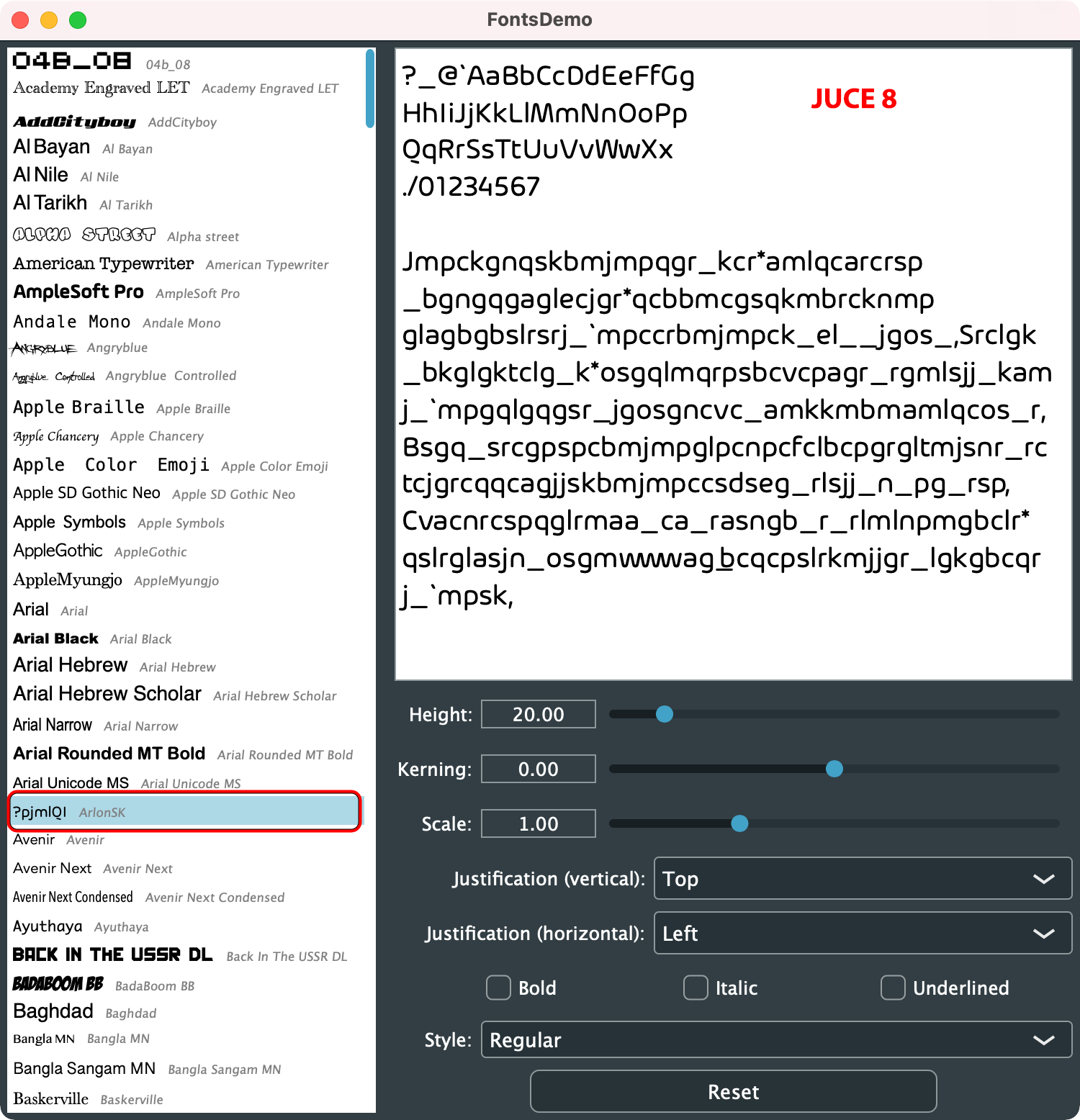
To reproduce - use the attached version of the FontsDemo, which includes the TTF font as an Asset. It also includes the OTF font to be installed in the Mac System.
FontsDemo.zip
Place the .otf version of the ArlonSK font in the Mac’s Fonts folder.
Generate project with corresponding version of Projucer.
Build with JUCE 7.0.12 - ArlonSK font displays correctly.
Build with JUCE 8.0.1 - ArlonSK font is corrupted.
If you remove the OTF version from the system’s Fonts folder, no issue.
If you put both the TTF and OTF version in the system’s Fonts folder, no issue.
It’s only when you put the OTF (only) in the system, and embed the TTF.
I’ve always worried that problems of this nature could have happened, given that createSystemTypefaceFor() works by temporarily installing the font system-wide, only to obtain a typeface that can be used locally to where the function is used.
That feels against the best practice advocated by Raymond Chen:
Don’t use a global solution to a local problem.
Since an operating system is a shared playground, you can’t just run around changing global settings because that’s how you like it. If two applications with opposing preferences tried this, one or both of them would break; the correct approach is to change the setting in a local scope to avoid breaking other applications.
in this case it’s not that two applications have “opposing preferences”, but there appears to be a problem due to a lack of “isolation” between the system-provided fonts and the ones that are embedded and only locally accessed by the application
A workaround to avoid this issue is renaming your fonts using FontForge to something unique before embedding.
However, there is an additional aspect: I use a custom font where I occasionally add new glyphs. On an update I realized that my new glyphs sometimes don’t show up because a different plugin already loaded a font of the same name. If multiple plugins try to embed a font of the same name which is not truly identical, the order of loading determines which version shows up in all of them.
I guess in order to use the system font rendering, there is no way around adding the fonts globally, but maybe JUCE could rename/re-id fonts using unique identifiers before adding them (temporarily) to the system.
Now that JUCE includes HarfBuzz, wouldn’t it be possible to use it to directly parse font files (or their content loaded in memory) and obtain a juce::Typeface implementation?
That would save the need of installing the font on the system just to parse the .otf file.
Also, that should result in a guarantee that the typeface appears identical across platforms, right?
We’ve now pushed a change to the develop branch that avoids this “installation” behaviour for fonts on macOS:
I wasn’t able to nail down exactly what was causing the garbled text. The “garbled” text is using shifted glyph indices, which results in a Caesar-cypher-like output. It’s surprising that the glyph layouts and shaping for the garbled text appears to respect the shifted glyph values, though. If we were just using one typeface for shaping, and a different typeface for rendering, then I’d expect the glyph advances (kerning etc.) to be set according to the typeface used for shaping. It looks more like the initial mapping of characters to glyph indices is returning the incorrect values, but as this happens inside Harfbuzz I can’t tell whether the issue is caused by JUCE, Harfbuzz, or macOS itself.
In any case, removing calls to the deprecated function CTFontManagerRegisterGraphicsFont seems to fix the issue, and is probably a good idea even in isolation. Please let us know if you still encounter problems with this change in place, and I’ll take another look.
Sort of, and we do something similar to this on Linux. However, in general it’s a good idea to use the system font facilities.
The best example is font fallback: when attempting to render a glyph that’s not present in the selected font, the OS is often able to find a good alternative font from the set of installed fonts based on attributes like weight and serif/sans-serif so that substituted glyphs don’t look too out-of-place. HarfBuzz doesn’t handle font fallback at all. If we want to support this use-case, using the system facilities will lead to better results than any alternative I can think of.
The new change does indeed avoid installing fonts temporarily on the system, but we still use CoreText to load fonts so that the system can build an appropriate list of fallback fonts.