
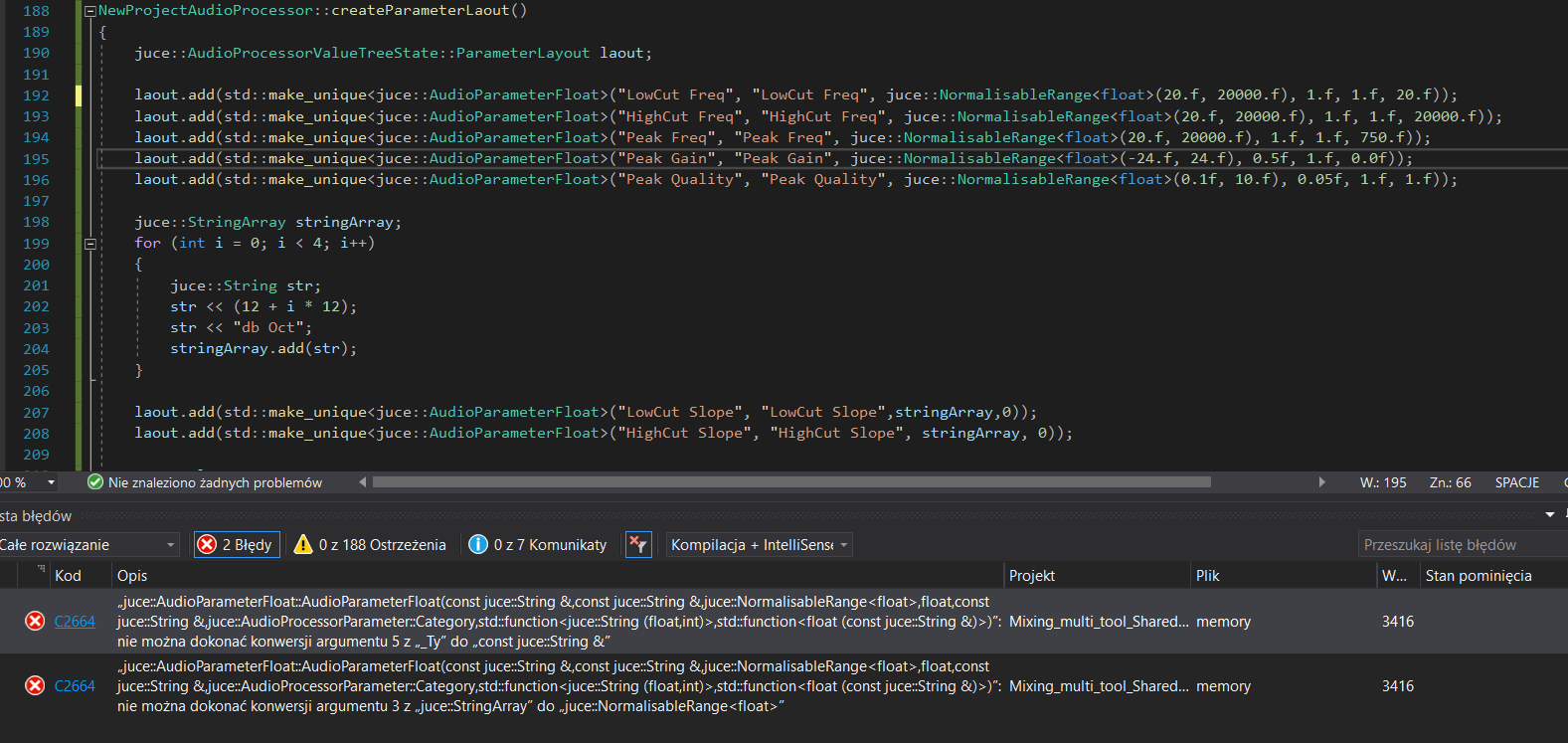
I’m still learning. I do eq according to the youtube guide. I try to rewrite and analyze it in the process. I rewrote the surface in what in the guide. It works there, I get an error.
you dont need that many parameters in your add function, just a little heads up.
<AudioParameterFloat>
but u are giving it a string array. youre looking for
std::make_unique<juce::AudioParameterChoice>()
i believe.
just a quick edit: line 207 and 208. but next time add your code as text so people can easily read and can quote specific lines.
1 Like
Thank you!
One of the two errors has been eliminated.
there is some problem with this lines. when I add it to a comment, the program compiles.
   laout.add(std::make_unique<juce::AudioParameterFloat>("LowCut Freq", "LowCut Freq", juce::NormalisableRange<float>(20.f, 20000.f), 1.f, 1.f, 20.f));
    laout.add(std::make_unique<juce::AudioParameterFloat>("HighCut Freq", "HighCut Freq", juce::NormalisableRange<float>(20.f, 20000.f), 1.f, 1.f, 20000.f));
    laout.add(std::make_unique<juce::AudioParameterFloat>("Peak Freq", "Peak Freq", juce::NormalisableRange<float>(20.f, 20000.f), 1.f, 1.f, 750.f));
    laout.add(std::make_unique<juce::AudioParameterFloat>("Peak Gain", "Peak Gain", juce::NormalisableRange<float>(-24.f, 24.f), 0.5f, 1.f, 0.0f));
    laout.add(std::make_unique<juce::AudioParameterFloat>("Peak Quality", "Peak Quality", juce::NormalisableRange<float>(0.1f, 10.f), 0.05f, 1.f, 1.f));
can you post the whole function? the entire “createParameterLayout” you have created
layout.add
    (std::make_unique<juce::AudioParameterFloat>("id_v0_input_gain", "Input Gain", juce::NormalisableRange<float>(-30.0f, 30.0f, 0.01f), 0.0f));
that is an example of how parameters of type float can be added.
the arguments are
- ID (what the functions like GetRawParameterValue use to find)
- NAME (show in the daw when the slider is moved)
- RANGE
- DEFAULT VALUE
1 Like
laout.add(std::make_unique<juce::AudioParameterFloat>("LowCut Freq", "LowCut Freq", juce::NormalisableRange<float>(20.f, 20000.f, 1.f, 1.f), 20.f));
Bracket was in the wrong place. Your example helped me. Thank you!
Now its working.
1 Like