Significant GUI Sluggishness & DAW Freezes on Windows/Nvidia (Suspected JUCE 8 / OpenGL / D2D Conflict)

Dear JUCE Team,

I am a long-time beta tester for several plugin companies. I am reporting a recurring rendering issue that appears to have surfaced with the transition to JUCE 8, specifically affecting Windows users with Nvidia graphics cards.

NOTE: I have no idea if these plugins actually use JUCE framework, so it’s just a hunch, so please take it as it is.

1. Symptoms and Reproduction

I have isolated a severe performance degradation that manifests in two ways:

  • Slower GUI Opening: Plugin GUIs released or updated after July 2024 are taking significantly longer to open—up to 10 times slower in side-by-side comparisons with earlier plugin releases of the same developers.

  • DAW Freezes on GUI Close: In multiple hosts (Reaper 7, Live 14, Cubase 15), closing a plugin window results in a consistent 1 second DAW-wide freeze after 4–6 seconds of closing the GUI.

  • The Trigger: This behavior is triggered when specific “culprit” plugins (notably the latest versions of Slate VSX, Relab Color Drive, and Relab 176) are present in a session. Once these plugins are removed, the DAW returns to normal speed instantly.

2. The Timeline Correlation

The issue appears to be strictly tied to plugins released or updated following the JUCE 8 release (June/July 2024).

  • Tested Older Versions: Earlier plugins from the same developers (e.g., Relab Sonsig Rev-A or previous versions of Slate VSX) do not exhibit this behavior and do not trigger freezes in the DAW.

Examples of conflicted plugins:
All newer Pulsar Modular plugins released after June 2024 (Fairuz and onward)
All Audiopunks plugins released aftrer June 2024 (610 and oward)
Crave EQ2, Crave Transient EQ, AnalogX Genesis, Vertigo VSS-2
VPROM, Tekno, Omnisphere 3, Kontakt 8

3. Suspected Technical Root

Given that this is specific to Windows + Nvidia configurations, I suspect a conflict in how the new rendering backend (potentially the Direct2D or the OpenGL context handling in JUCE 8) interacts with the Nvidia driver’s window management.

  • Environment: Windows 11, Nvidia RTX 4070.

  • Observation: The freeze occurs even if the “trigger” plugins are bypassed with their GUIs closed, suggesting a persistent background rendering or context-holding issue within the session.

4. Supporting Evidence

I have captured video demonstrations of the slower GUI loading and closing times

Video

Notice when the Relab plugins are greyed out (offline) the opening and closing of the other plugins are super fast, and instant. If i put those plugins online, just opening and closing a single GUI can take up to 5 seconds, while the DAW is completely frozen.
If i downgrade VSX to the version before the latest, the issue goes away, and if i combine these ‘trigger” plugins, the issue gets multiplied.

Has there been a known change in how JUCE 8 handles OpenGL contexts or Direct2D synchronization on Windows that could be conflicting with Nvidia’s “Max Frame Rate” or power-management settings?

Thanks
Matt

There are some related posts:

But I would suggest reporting those problems to plugin manufacturers instead. They can share JUCE team with the exact JUCE version number & some code to push things forward. JUCE 8 & Direct2D performance has been improved a lot since the first JUCE 8 version (there are also some recent changes on the develop branch).

The freeze occurs even if the “trigger” plugins are bypassed with their GUIs closed, suggesting a persistent background rendering or context-holding issue within the session.

That sounds interesting. AFAIK the Direct2D context should only be active if the GUI is open, unless there is some crazy code in the plugin.

Hi there. As noted in the linked thread - does the problem go away if you disable all frame rate limiters in GPU config? There might be a few different ones.

Alternatively - if you’re technical, just as a test, try making a copy of your DAW’s main executable and renaming the copy to “chrome.exe”, and see if that makes the problem go away (Nvidia drivers appear to have workarounds for chrome’s GPU behaviour that might solve this problem).

My theory is each plugin window’s update counts as a “frame update” which consumes the GPUs frame rate limit, leading to the driver hard blocking new frames.

(Hmm, the problem you described isn’t exactly like the one I noted, but it could still be related…)

That sounds interesting. AFAIK the Direct2D context should only be active if the GUI is open, unless there is some crazy code in the plugin.

I think the d2d path does some delayed cleanup after the last Editor instance is closed, but I could be mistaken.

1 Like

Oh, I am not familiar with the low level D2D code :slight_smile: it is highly likely you are correct.

What I want to say is that some plugins seem to do (heavy) things on the message thread when they are enabled, even when their GUI is completely closed (at least during the video). It is quite strange cause Reaper does not create the editor in such case …

Hi!

Yes i have read your thread, and tried all.
I never had frame limit enabled, so those were OFF by default. And yeah i tried renaming reaper to chrome.exe, and nothing changed.

I think the d2d path does some delayed cleanup after the last Editor instance is closed, but I could be mistaken.

Now this is something that has some clue in it!
I don’t know if i show this in the video, but there is another side effect:
Every time i close the sluggish plugins, after the GUI disappears, there is a 4-6 second delay, where everything works correct, and then BOOM, a one second DAW-wide freeze.
This happens consistently, every time. So there is some kind of a delay, when the plugin like “clears itself from the cache” (sorry im not a developer :D)
If i re-open the same GUI BEFORE that 4-6 seconds, the freeze does NOT happen.

This also can be tracked with the built-in windows performance monitor.
When the GUI is open, the GPU 3D chart shows a 10% usage. If i close it, the 10% is still there for 6 seconds, and THEN it flushes it, with a hickup in the DAW (but ONLY if VSX or Relab plugins are present in the project)

Here is another video

  1. I open 10+ instances of Crave EQ at the same time with a shortcut.
  2. They load very fast, and close instantly
  3. Then i insert the latest VSX version, and close it’s GUI
  4. Now i open the 10+ GUIs, and it takes ages, and even more to close them.
  5. Then i insert the previous VSX version
  6. Now everything is snappy again

Video

So something happened between those 2 versions, cause it never did this before.
Im trying to contact them again, maybe they are willing to disclose….

Digged in deeper with Windows Performance Analyzer. I have recorded a few scenarios.

First, i found out that one of the affected plugins that’s GUI open and close time is slowed when the trigger plugins are present, did not have this problem with version 1.0.0, only when i updated to 1.0.1. The developer said that they use the same JUCE for both. But WPA shows a big difference:

Version 1.0.1 loads the following NVIDIA and DirectX DLLs which were completely absent in Version 1.0.0:

  • nvldumdx.dll (Nvidia User Mode Driver)

  • nvgpucomp64.dll (Nvidia GPU Shader Compiler)

  • nvmemmapstoragex.dll (Memory Mapping)

  • nvwgf2umx.dll (Nvidia Graphics Framework)

  • d3d10warp.dll (DirectX Software Fallback)

So this confirms that the update (v1.0.1) shifted from a software-based renderer to a hardware-accelerated path.

Gemini had to say this, (i don’t know how much of it is hallucination :smiley: )

The Hang/Freeze Mechanic:
The 1-second freeze occurring 4-6 seconds after closing a GUI suggests a Deferred GPU Context Cleanup issue. The DAW is likely waiting for the Nvidia User Mode Driver to release resources. When the driver fails to handshake correctly with the new JUCE rendering context, it hits a ~5-second timeout, triggers a “hard release,” and causes the momentary system-wide hang.

PS: I have tested this with other developer’s plugins, and ALL of them that are affected by this slowdown uses the Nvidia drivers, and their earlier plugins that behave correctly, does NOT.
So it might be the same JUCE framework, but at some point they all switched to accelerated rendering which now fights with the “trigger” plugins.

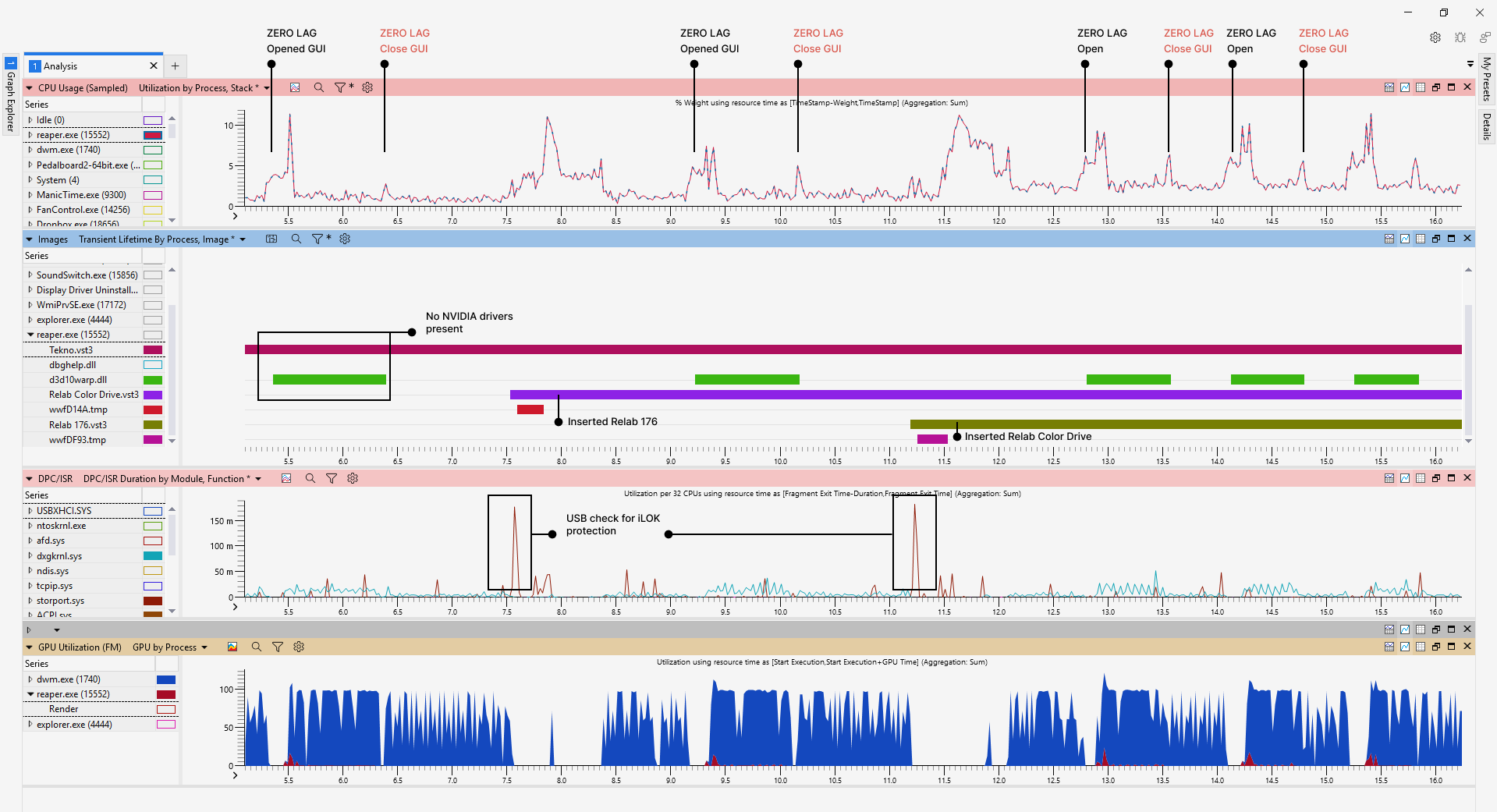
Here is another perspective. I launch the VSTi plugin TEKNO (seem to be using WebView for the GUI)

  1. First i open and close TEKNO GUI - no other plugins in the session = instant load and close
  2. Then i do the same, but VSX is present in the session = GUI opens 3x slower, has a 1 sec lag at close
  3. I open and close TEKNO, but VSX and Relab 176 is present = open and close lag multiplied by 2
  4. I open and close TEKNO, with VSX, 176 and Color Drive = open and close lag multiplied by 3

The presence of d3d10warp.dll is a good indicator for when the GUI actually is rendered in the DAW. You can see that the closing lag times are EXACT multiples of the number of “trigger” plugins inserted. Also it’s visible that even after closing the GUI, the NVIDIA dlls keep running while the lag happens, furthermore the GPU utilization chart clearly reveal the reduced GPU rendering activity while the freezes happen.

I don’t know if this useful info at all, i’m gonna try to send it to the affected companies.

Out of curiosity and slightly OT:
Are you offering your testing service or do you plan to?

Maybe there are companies that are more appreciative of your feedback. Feel free to DM me…

Cheers and good luck

Daniel

1 Like

I have used LLM to condense the information, i think it did a good job:

TECHNICAL ANALYSIS (WPA & DLL COMPARISON):

I have isolated a major performance regression affecting Windows/Nvidia users following the transition to hardware-accelerated rendering in recent plugin updates.

Key Finding (The “Vulnerability” Shift):
The regression is clearly visible in the update of The Great British Spring (Audio Punks) from v1.0.0 to v1.0.1.

  • v1.0.0 (Fast): Did not use Nvidia for rendering; completely immune to the lag.

  • v1.0.1 (Slowed): Now loads nvwgf2umx.dll, nvgpucomp64.dll, and d3d10warp.dll. While it is not a “Trigger” itself, it has become vulnerable to the lag created by actual Trigger plugins.

The “Trigger” vs. “Affected” Hierarchy:

  1. Trigger Plugins: (e.g., VSX, Relab 176, Color Drive). These plugins create a “sticky” or problematic GPU context that hijacks the Nvidia User Mode Driver.

  2. Affected Plugins: (e.g., TEKNO, GBS v1.0.1). These plugins also use hardware acceleration (Nvidia/Direct2D), but they are “victims.” Their GUI performance is degraded (up to 10x slower) because they are stuck behind the “Trigger” plugins in the driver’s resource queue.

The “Linear Lag” Observation:
Testing confirms that the performance hit is cumulative and linear based on the number of Trigger plugins present:

  • 0 Triggers + TEKNO: Instant load/close.

  • 1 Trigger + TEKNO: ~1s lag when closing.

  • 3 Triggers + TEKNO: ~3s lag (Exact Multiples).

Implication for Developers (JUCE 8):
The presence of d3d10warp.dll in these sessions indicates that the Nvidia driver is struggling to synchronize multiple concurrent hardware-accelerated contexts. Because the DAW’s message thread is a single queue, every “Trigger” plugin added to the session creates a sequential 1-second “handshake” delay during GUI cleanup. Even “Affected” plugins (like GBS v1.0.1) that are otherwise healthy are blocked from rendering until this serial queue is cleared.

Reproduction Tip:
Monitor the DAW with Windows Performance Analyzer (WPA). The 1-second freeze per trigger occurs exactly when the Nvidia driver hits a timeout trying to release a “Deferred GPU Context” from a plugin that has already had its GUI closed.

This is the “Smoking Gun” in its final form:

I have uninstalled the NVIDIA 4070 drivers, and by forcing the system onto the Microsoft Basic Display Adapter, I have effectively bypassed the entire Nvidia User Mode Driver (nvwgf2umx.dll) and forced the OS to use WARP (d3d10warp.dll) as the primary system renderer.

Lo and behold, the problem, completely goes away:

Under the Basic Display Adapter, the DAW no longer loads nvwgf2umx.dll or nvgpucomp64.dll. GUIs open instantly, “unknown memory transfer” spikes are gone, and the linear closing lag is eliminated.

LLM:

The lag is probably caused by a Blocking Serial Handshake within the Nvidia User Mode Driver (nvwgf2umx.dll). When a “Affected” plugin GUI is closed, the driver holds a “warm” context for ~5 seconds. During this window, the driver’s memory manager stalls any other GUI actions while it waits for a hardware timeout. This freeze is bypassed entirely when using software rendering (Microsoft Basic Display Adapter), proving that the issue lies in how the latest plugin frameworks (likely JUCE 8) are communicating with Nvidia’s memory mapping and context management on Windows 11.

2 Likes