I’ve been enjoying the juce update but today when i went to test on my Windows machine, pretty much no functionality was working.
I don’t mean to use that lightly.
Pretty much no juce code was being run in a reasonable time.
I checked on some older commits and they are working fine, its only after the upgrade to juce 8.
One of the first things my plugin does is set some colours in an image, for the ui:
        for (int y = 0; y < img.temp.getHeight(); y++) {
            for (int x = 0; x <img.temp.getWidth(); x++) {
                if(img.temp.getPixelAt(x, y) == pholder)
                {
                    img.coloured.setPixelAt(x, y, col);
                }
            }
        }
This code, which used to run in under a millisecond, now takes upwards of 2 seconds depending on the image.
It’s possible that I would have done something wrong but I can’t for the life of me figure out what it is as it seems like a much larger problem.
I don’t know if this related but I sometimes hit the same error as this
And as he says, clearing the build folder works.
I have tried updating to the latest develop branch.
I am at a loss, any help would be very appreciated !
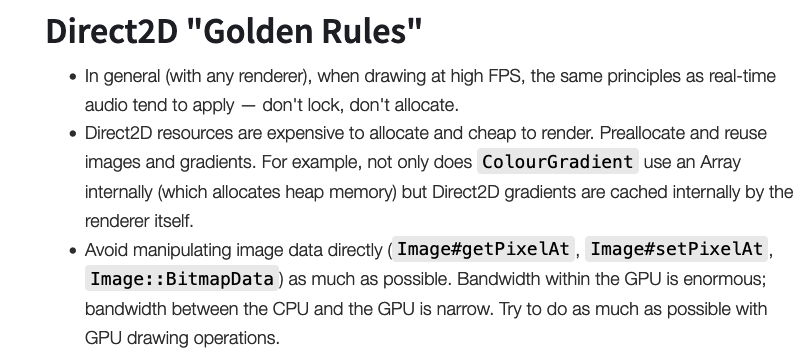
If you want to access the pixel values of an image, the efficient way is to use Image::BitmapData.
I don’t see any difference in performance between JUCE 7 and JUCE 8 (and I use a lot Image::BitmapData … I don’t develop audio applications but software for geomatic & remote sensing).
Maybe it’s clearest to say “Specify the SoftwareImageType in the constructor if you want to keep your code the same as on JUCE 7”
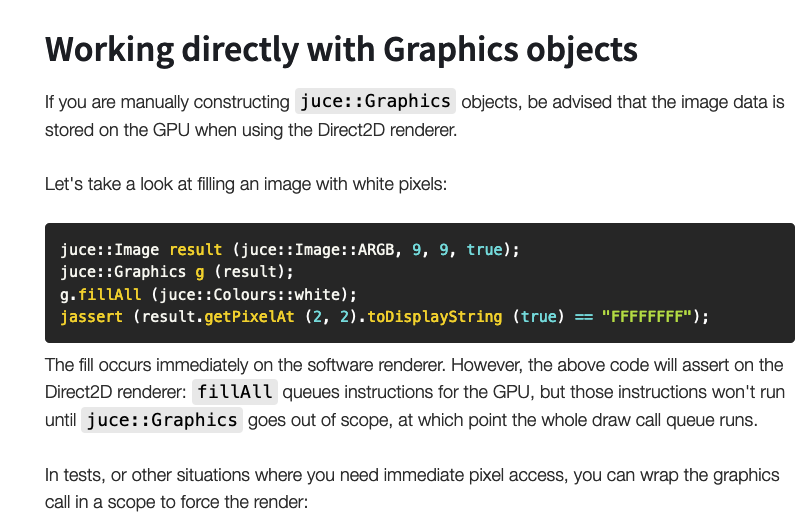
The problem is that get/setPixelAt spins up a new BitmapData. On the Direct2D renderer, the GPU texture is synced and rendered into something the CPU can read. Looping over set/getPixelAt will do this per pixel which is why it’s adding up.
The two options are:
Avoid get/setPixelAt. Create your own BitmapData object to sync once, and get/set colors with its get/setPixelColour.
That’s how the Direct2D window renderer works in paint methods (all your g. draw calls are queued commands, nothing happens until the end when it’s all rendered in big batch).
But if the goal is “I want to iterate over pixels on an individual image” then you are taking things manually into your hands exactly because you want CPU access to the individual pixels. The sync’ing back to the GPU happens when the BitmapData object goes out of scope, so you have some amount of control there…
Here’s an example of creating and painting a software image, then converting it to a native image just as @fuo described:
juce::Image createImage()
{
    //
    // Create a software image
    //
    auto softwareImage = juce::Image{ juce::Image::PixelFormat::ARGB, getWidth() / 2, getHeight(), true, SoftwareImageType{} };

    //
    // Fill the software image with the software renderer
    //
    // Scoping the Graphics object isn't necessary here but would be for the Direct2D renderer
    //
    {
        juce::Graphics g{ softwareImage };
        g.fillCheckerBoard(softwareImage.getBounds().toFloat(),
            64, 64,
            juce::Colours::white,
            juce::Colours::lightgrey);
    }

    //
    // Edit the software image
    //
    int x = softwareImage.getWidth() / 2;
    for (int y = 0; y < softwareImage.getHeight(); ++y)
    {
        softwareImage.setPixelAt(x, y, juce::Colours::red);
    }

    //
    // Convert the software image to a native image; on Windows with JUCE 8 this will be a Direct2D GPU-stored bitmap
    //
    return juce::NativeImageType{}.convert(softwareImage);
}
We don’t do direct image manipulation but we noticed a dramatic slowdown with JUCE 8 (latest develop) with components that use setBufferedToImage(true).
For now we just disabled all those calls on Windows, but I think it’s probably something to look at.
Thank you for all your suggestions but now I’m facing a much more serious problem that is harder to diagnose.
I seem to have fixed the windows build for myself by using juce::Image::BitmapData.
However, after sending the build to some Windows testers, they report that the plugin still crashes on open.
Since the issue doesn’t reproduce itself on my Windows machine its become very hard to figure out whats going on.
The issue was happening to @Mrugalla so I asked him to build and debug locally, and he was able to get it fixed using juce::SoftwareImageType().convert().
The problem arises though, when I build through my Github Actions build process in my repo. When i build and send him the binary, insta crash, when he builds, works fine. Same code.
I’m not sure if theres some hidden setting in my cmake configuration that is different to the projucer configuration which causing this.
Do you static link C++ runtime? If not, because Github action Windows runner has updated its C++ runtime recently, you have to install the latest C++ runtime libraries (and you have to ask all your users to do so).