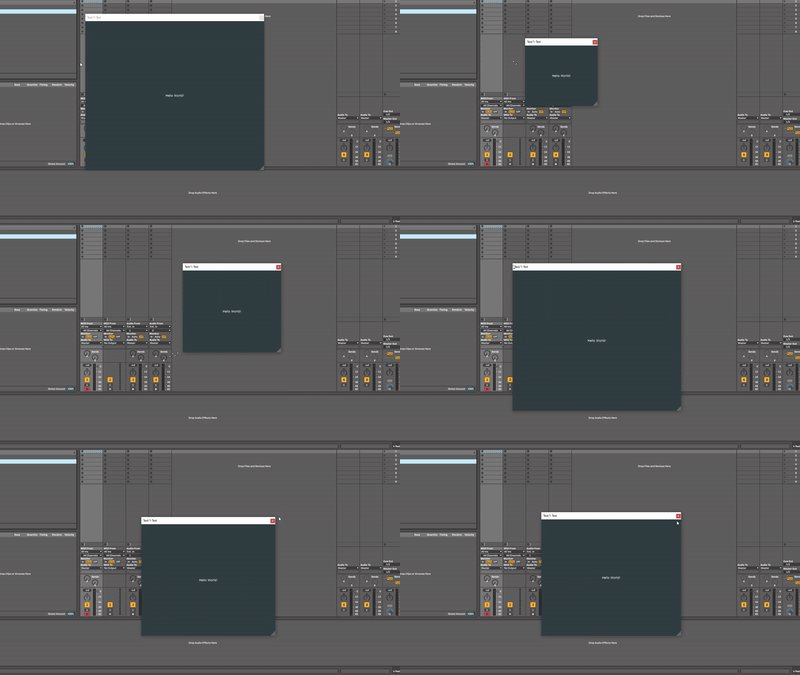
Hey JUCE,
I’ve encountered some scaling issues with a resizable plugineditor on Windows 10, with VST3 in FL Studio 20, Bitwig and Ableton 10. (using the setResizable() method with all argument combinations). I’ve encoutered this issue in product code. The same issues come up with an empty JUCE plugin with only the setResizable() method added.
Some specs:
Windows 10 Home 64bit 19042.746
Plugin format: VST3 64bit Release
JUCE version: 6.0.7
FL Studio version: producer edition v20.8 (build 2115) (64bit)
Ableton Live 10 Suite (10.1) build: 2019-05-14_820f098a4a
something about FL and resizing
During the testing of product code with VST3 I’ve found out that FL Studio shows 2 resizable corners. One from JUCE from the plugin itself and one from FL Studio. FL Studio only shows this resizable corner, when a resizable plugin is loaded. Otherwise no resizing tooltips are shown.

FL Studio glitches
This often happens when I reduce the size of the plugin window using the FL studio corner tooltip. There is always bottomright piece of the editor left black. When this happens resized() or paint(Graphics&) are not called.

This always happens when I resize with very small plugin sizes using the JUCE resizable corner. This one is not really interesting for the product code, as the window size is extremely small, but I figured it might be helpfull to add as well. When this happens the juce::Component bounds are wrong 100w, 50h instead of the actual 150w, 50h, so I guess that’s why the painting is warped

Ableton glitches
I’ve only encountered Ableton glitches once, using the same build, which is weird. But I will update if I encounter the same glitches again.
When enlarging the plugin using the JUCE resizable corner

When shrinking the plugin window using the JUCE resizable corner

What works
Unmentioned interactions in FL or Ableton work great.
Resizing further works great in:
- Cycling Max8
- JUCE AudioPluginHost
- Traction Waveform
In general release builds seem to do a lot better and seem have less chance of glitching
Any ideas on how to fix this?


 !
!