Hi,
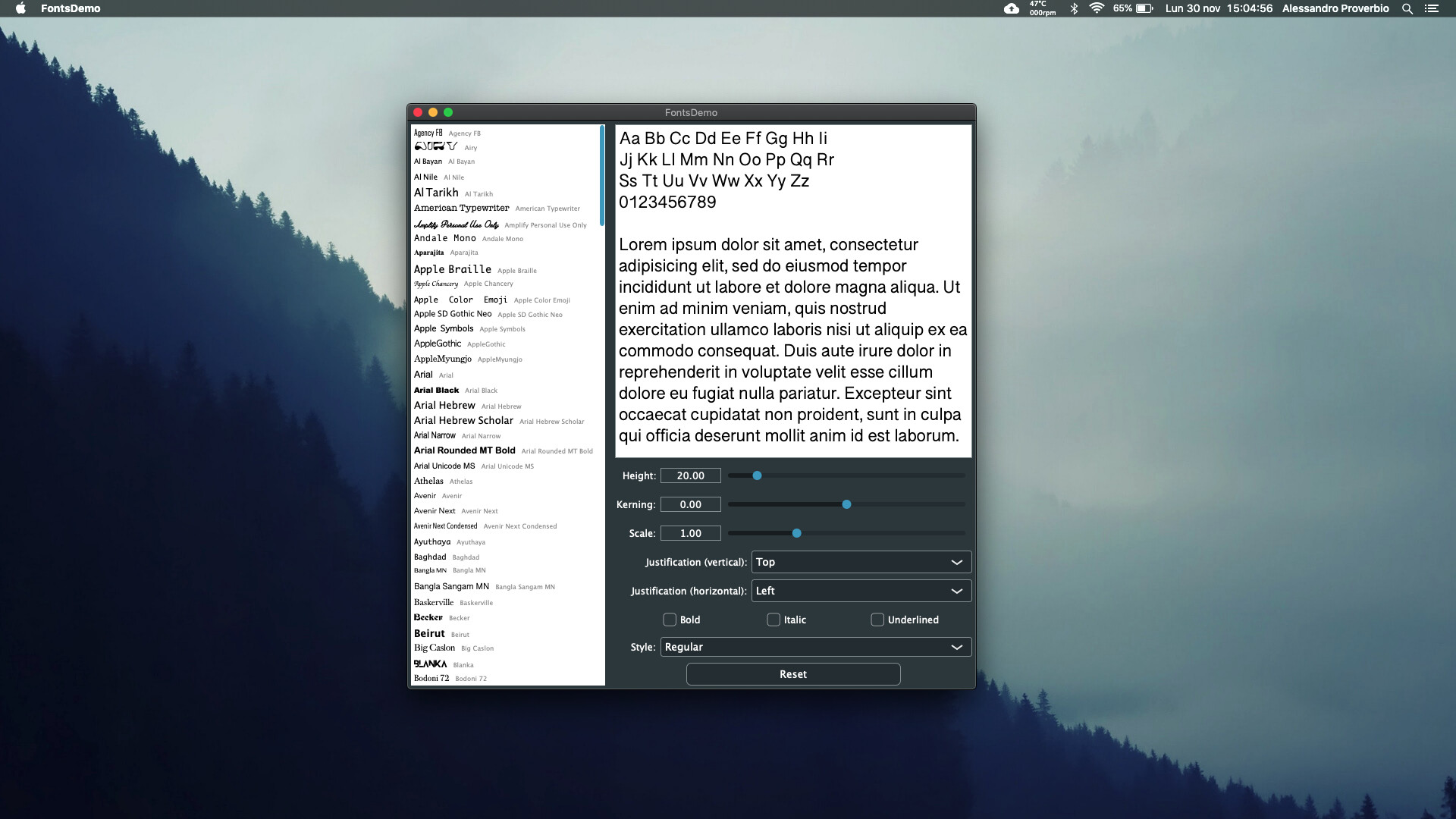
I’ve always used JUCE on macOS, and I’ve never had a single issue in the GUI rendering. Now, for the first time I’m using JUCE on Windows 10. I coded a very basic audio application (a label and a button) and I noticed immediately that the app was blurred, especially the text. So I have moved back and I’ve tried compiling one of the examples of the JUCE library, without touching anything in the code. The results have been the same: blurred text and low res. The difference between that app built with JUCE and other apps like browser and code editor, was clearly visible.
The setup is:
- Windows 10 1909
- Full-hd monitor with Windows scaling set to 100% (but it does the same with 125% scaling)
- latest version of JUCE 6.0.4
- visual studio 2019
Both Visual Studio and JUCE have been fresh installed today. As an example I attach two screenshot of the same app, the fonts demo, on Windows and macOS. These screenshots have been made on the same external full-hd monitor. The macOS version is indeed sharper and way less blurred. Just look for example at the “L” of “Lorem”, the difference is clear.
What am I doing wrong? How can I have the same sharpness I see in macOS and other Windows apps also in the JUCE ones?
Thank you!