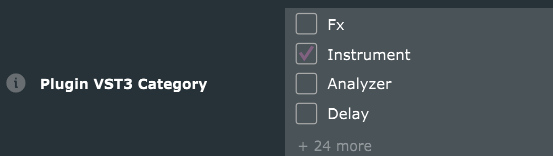
I have a midi-only plugin I’m working on, but I am adding a ‘silent’ audio channel because of the limitations of VST3. (Also making it a VST3i for FL Studio).
Do you buffer.clear() the audioBuffer at the beginning of your processBlock() ? I was doing that , but read somewhere that its better practice to not do that so audio can pass through unaltered.
Anyway, that seemed to work for a couple of times, then I got an “AutoMute” on my track in the DAW, indicating that audio volume > +2.0db was coming through even though I didn’t hear a thing.
I put the buffer.clear() back at the beginning of my processBlock() and the AutoMute went away.
Anyway, just wondering what best practice was on this?
You might need to clear out FL Studio’s plug-in cache. Some DAWs keep holding on to the old bus config unless you rescan the plug-in (or clear the cache).
Note that the configuration in the constructor is just a default.
The real configuration is negotiated in isBusesLayoutSupported() and a subsequent setBusesLayout().
What you probably should do is to check in processBlock, if there are input buses that are not connected to outputs.
The code in the boilerplate should actually take care of that:
for (auto c=getTotalNumInputChannels(); c < getTotalNumOutputChannels(); ++c)
    buffer.clear(c, 0, buffer.getNumSamples());
Should a midi plugin actually be clearing the audio buffer at all?
What if I have an instrument before my midi plugin that is generating audio, by clearing the audio buffer, my plugin would not allow that legitimate audio to pass through it (?)
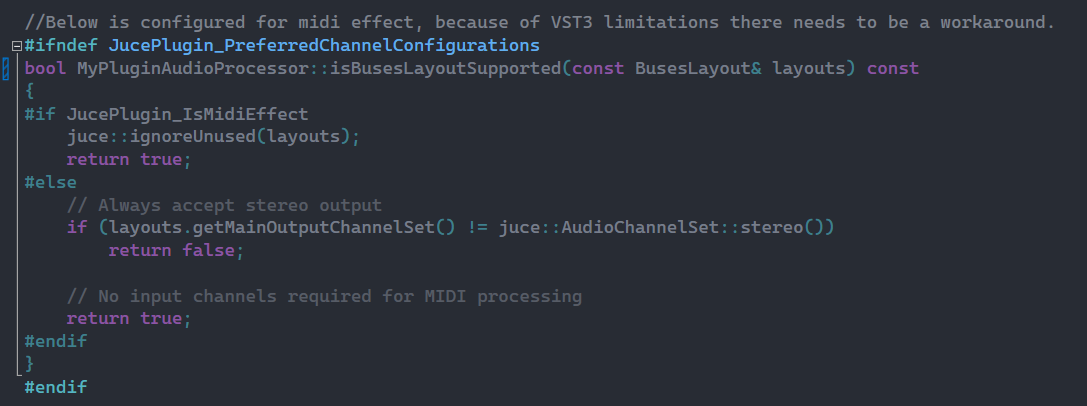
Here’s my isBuses…(). I think I noticed something wrong with it. It may not be being called. I’m uploading a image of it rather than a ```
The MyPluginAudioProcessor should be in yellow, its grayed out, …I’m going wrong somewhere.
It is difficult to say. TBH I am removing the macro clutter so I can be certain, what it is using. I am not configuring code from the Projucer.
The only chance that your plugin returns false is, when the macro is set to not a midi effect and the main output not a stereo bus. You are accepting almost every layout.
But like I said in the previous post, you should base your decision on the actual buses layout that the host had set in setBusesLayout.
And the getTotalNumInputChannels and getTotalNumOutputChannels will honour this setting.
since some DAWs just don’t accept midi plugins at all the safest way to make something that acts like a midi plugin is to make an audio effect that has a midi output and then you just keep the audio untouched with whatever channel configuration the DAW wants
If it does not have an output bus, there are no audio buffers and so that specific question could be answered with “no”.
However, as you say you added an output bus. So if there’s an output bus, there should be some defined output on that bus. And if you don’t have an input bus, there is nothing defined coming in that you could or should let through. If there is an input bus and it has the same layout as the input bus, you can get away with doing nothing, because something defined is coming in and you’re letting it through in a deterministic way.
Long story short: as long as you have an output bus, it is your responsibility that it outputs something reasonable. And if there’s no input and you have nothing worthwile to output, the most reasonable choice is silence.
You can only have an instrument before your midi plugin if it has an input bus. If that’s the case the most reasonable choice is a bypass. However, the only way you can have a valid bypass by just doing nothing at all, is when the input and output bus configuration are the same. Otherwise you’d have to do some kind of mapping/broadcasting/zerostuffing/whatever.
I’m trying to take into account that some DAWs don’t accept midi fx plugins, and making it an instrument. Do you have an opinion on my setup below, anything missing or incorrect ?
I’m also reading that FL Studio needs a workaround. And Bitwig, Reaper, and Logic had specific routing problems, adding an audio output helps apparently.
I was reading that I must have audio output channel in my midi plugin to maximize DAW compatibility as a workaround because of VST3 poor midi support.
Apparently it helps DAWs like Bitwig, Logic X and Reaper with routing issues.
In isBusesLayoutSupported() I don’t think I’ve got it properly configured yet. the #ifndef above it looks like its stopping it being called, so I need to adjust that (see image in my post above).
This worked for me, thanks. The AutoMute isn’t triggered now, and I tried putting a synth before my plugin, and its audio passes through.
Also, I did have this flag set to get rid of dozens of unwanted parameters being displayed in my DAWs non-GUI version of the plugin: JUCE_VST3_EMULATE_MIDI_CC_WITH_PARAMETERS=0
But this meant that existing incoming Midi CC messages weren’t being passed into the plugin, so I have to take that flag out and live with it.
I did look into overriding getParameters() and removing parameter IDs that are related to Midi CC messages, but didn’t take that step yet because I don’t know if it would have other consequences.