
I’m using the AudioAppDemo, and when I try to compile, it will say that “setAudioChannels not declared in this scope”. This is the case with everything that was intialized in the AudioAppComponent header file. However, I have included the modules folder and everything in it in my include path. How can I get around this so that I can run AudioAppDemo? Are there any other things I should look out for?
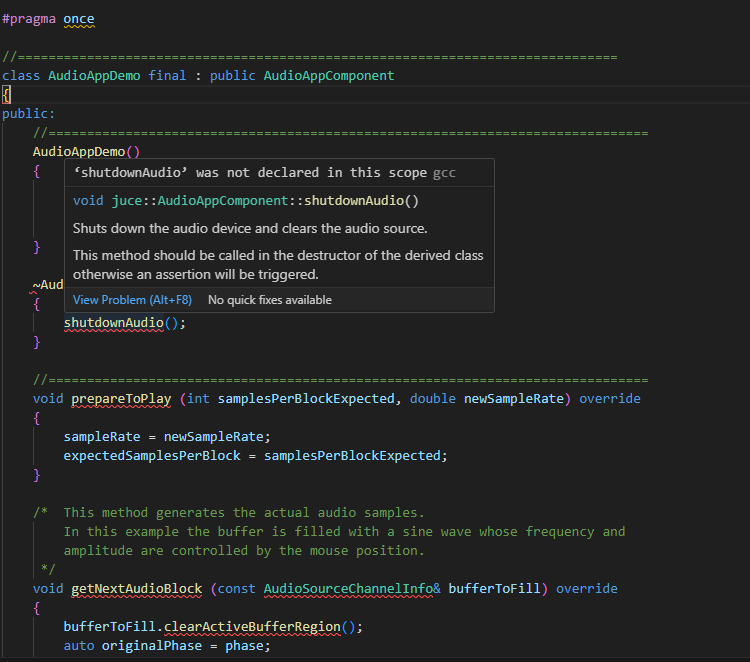
I suspect (though I’m not sure) that the error message you’ve highlighted isn’t your real problem. There’s a very annoying bug in Visual Studio where Intellisense can’t read the Juce headers files on new projects, and so reports lots of errors. (I can see this in your screenshot, as there are lots of squiggly lines for Juce types that Intellisense cannot recognize). Once you successfully compile it for the first time, Intellisense will catch up with the Juce header files, and the problem will magically go away.
Probably there is another problem with your code which is preventing the file from compiling. Unfortunately, you’re going to have to look through all of the generated error messages and ignore the pseudo-errors to find the real error. This can be quite frustrating.
Can I ask which compiler you’re using? You also have an Intellisense error with #pragma once which seems unusual. Are you using an up-to-date compiler?
Yeah, I’m using the most recent VS Code right now, and I think you might be right because now I am seeing some new errors:
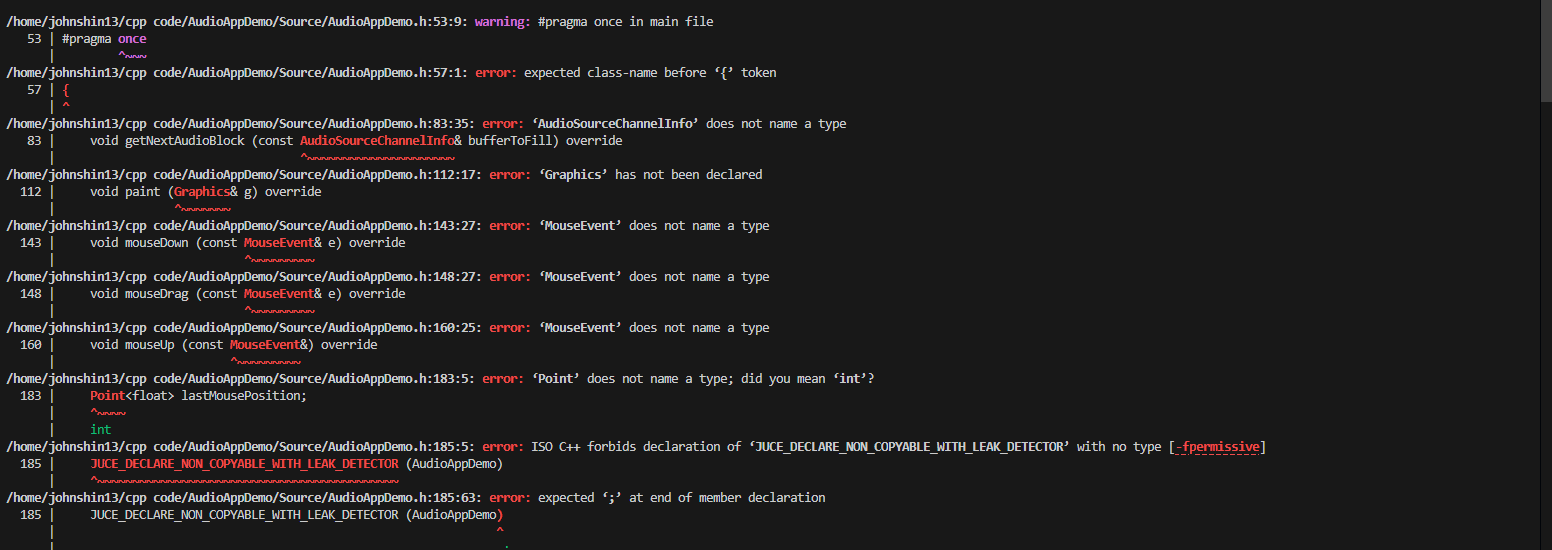
Try commenting out the #pragma once line and see if it works. (This isn’t good practice in general and you’ll definitely run into problems without #pragma once, but the compiler doesn’t seem to like it right now and it might be enough to get you off the ground).
I’m not an expert on IDEs, but I think that Visual Studio Community might be a better choice for building Juce plugins. VS Code is pretty lightweight, and last time I tried it I couldn’t get it working with Juce. Others on this forum will know better than me, though.
I commented out pragma once but yeah, the errors stay the same. The type of errors also vary so yeah I’m not sure what the issue could be. Is Visual Studio Community also an IDE?
Yes, Visual Studio Community is a heavyweight IDE, free to use on Windows, and widely used by Windows Jucers. It’s a large download, but you should be able to get the demo up and running pretty easily.
None of the JUCE types are recognized, so it’s very likely you have the global using namespace juce; disabled (which I would say is a good thing). Either activate that option (in Projucer) or (better) put a juce:: before all the Juce class names and you should be fine.
I agree that the error message is not pointing to the real problem. Could you post how you set up your project (Projucer/Cmake, etc.) and your OS?
I’m currently using Windows with WSL (Ubuntu), as for Projucer I simply included all my paths to the modules folder and I don’t think I have CMake because I was using g++ to compile, unless CMake does something different. I thought CMake and G++ were both compilers.
Unless you’re passionate about figuring out build systems, I would recommend getting going with one of the 3 main desktop environments Projucer will give you. As mentioned, Visual Studio on Windows works smoothly with Projucer. For Linux, you can use the generated makefile with Visual Studio Code, but I would be calling make rather than gcc directly. There are tasks/launch json examples in the forum:
Solved: I caved and installed Visual Studio Community, and I have to say, I’m pretty impressed at how rapidly my problems were solved. I’m now able to start programming right away.