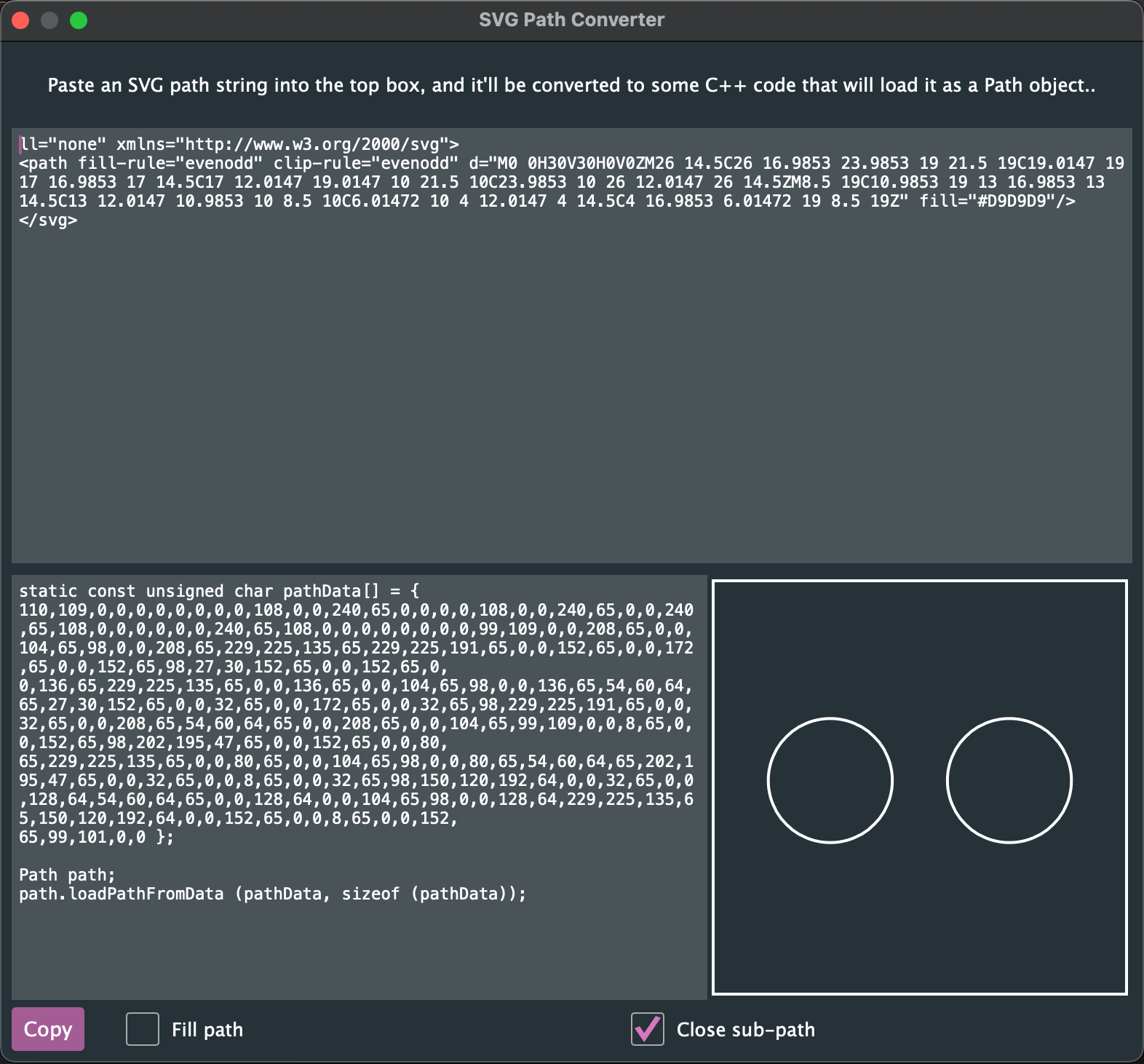
there are several problems with the calculation of the view box. width affects height and vise versa and its never the right size. It also adds rogue paths to resize it . i can understand why but thats doesn’t seem like a proper solution.
i am aware that the directionality might be wrong for the fill rule, but chrome, figma, sketch and other software are able to render those correctly even with the wrong directionality of the paths. I dont see any reason for it not to work on juce.
1, 2 ) perhaps this is not exactly a bug, but it is surely not good practice.
editing each SVG is very annoying and completely unnecessary.
This tool is supposed to save time, not cost time.
Especially since the tool supports drag and drop of svg files.
So are these bugs or unfinished code and does it matter?
3 ) As I noted, the directionality of the path needs to be reversed - however if you try to open the SVG via standard software - they can deal with any direction you give them and render it correctly.
Otherwise i have to use hacky figma plug-ins that work half the time or to copy it to sketch app to fix there or even to SvgPathEditor. All of which can waste many hours when one has to deal with multiple files.
If it can be made to work - and it can - then again we have a case of unfinished code.
The fact the SVGPathEditor shows it like in Juce - does not mean that juce needs to do the same as they have different use cases.
One should be able to just right click in figma, copy the svg code, paste it in the window and instantly have a usable path to work with.
Drawable::parseSVGPath is not a useful choice because it has the exact same issues as the tool - and it requires coding which is a waste of valuable resources. especially if the svgs need to be checked for directionality and fixed and even more so if the designer can do the job - and present working SVGs.
To save some time, I made a project that converts svg to paths without the issues of 1 and 2. it saves a lot of time.
on the way I also supply juce path creation code to use with paths that need to be manipulated and animated.
What the code does not support at the moment and I might update it to do in the future:
analyzing the directionality and fixing it automatically on import
This looks super useful, perhaps you could GPL license it and get some help that way?
I also find the Projucer being unable to strip off the <svg> code automatically annoying. I also now use CMake religiously and so not needing a Projucer build would be handy for the times I need to convert an SVG to Path data.
Yes, nice tool! Thanks for sharing. I like how it converts into readable JUCE code. If it grows to convert a complex SVG file containing different shapes, colours, etc. into proper readable JUCE code, that would be very useful.
To get the Projucer to strip off the unnecessary code I made a very minor change to jucer_SVGPathDataWindowComponent.h. Just before the line path = Drawable::parseSVGPath, I added:
auto pathFromFile = text.fromFirstOccurrenceOf (" d=\"", false, false).upToFirstOccurrenceOf ("\"", false, false);

if (pathFromFile.isNotEmpty())
    text = pathFromFile;
That works of course only with simple files which contain just one path, but that’s all the Projucer handles anyway. But it is very nice to be able to just drag and drop SVG files and not have to copy and paste just the SVG path.
EDIT: Duh! I just realised that the Projucer does strip off the code automatically if you drag an svg file into the window. It only doesn’t work properly if you paste the contents of the entire file in there.
I GPLed it and i will accept good pull requests.
I think JUCE should take control of this project really, however until that happens if it does, we can work to improve it.
This project relies on the module juce_build_tools which is unfortunetaly located in the extras folder and not the modules folder, which means that one must edit their projucer to direct to that path.
not the most optimal way, and I have no idea how to use the JUCE global path as a token within the custom path within projucer - if anyone has an idea i would be glad to implement something that just compiles without any complications
As to the issue number 3, the problem is that the path is being displayed using a non-zero winding rule, which is the default in JUCE. The conversion is actually being done correctly. All you have to do is add path.setUsingNonZeroWinding (false); to your resulting path and it will be rendered correctly.
It would be nice if the Projucer tool had a tick box to display the paths using a non-zero winding rule and if it would add the flag-setting function to the resulting code.
But still, I insist that the Projucer’s converter is an extra step which is unnecessary. You still have to copy the pathData which it spits out into your code. Instead, you can use the original SVG path (which is usually much shorter) directly via Drawable::parseSVGPath.